
Calculator Guide
To use the calculator correctly, follow these steps.
- Select the cryptocurrency you want to calculate
- Select a tab. Position Calculator or PNL Calculator
- Select the position direction. Position UP or Position DOWN
- Fill in the required fields
- Click Calculate
Position Calculator
Use this tab to calculate a position built from one or multiple orders.
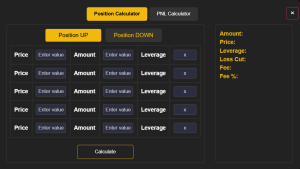
Steps
- Open the Position Calculator tab
- Select Position UP or Position DOWN
- Enter the order parameters. Order price, Amount, Leverage
- If you are building a position from multiple orders, add up to 5 orders and fill the parameters for each one
- Click Calculate
Result
You will get:
- Position amount
- Average entry price
- Average leverage
- Loss cut value
- Fees
PNL Calculator
Use this tab to calculate PNL and PNL percent, or to calculate the Sell Price for a target PNL percent.
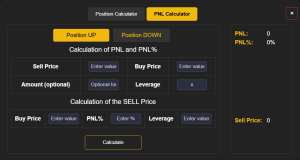
Mode 1. Calculation of PNL and PNL percent
- Open the PNL Calculator tab
- Select Position UP or Position DOWN
- Enter Buy Price and Sell Price
- Optionally enter Amount
- Enter Leverage
- Click Calculate
Result: You will see PNL and PNL percent on the right.
Mode 2. Calculation of the Sell Price
- Open the PNL Calculator tab
- In the Calculation of the SELL Price section, enter Buy Price
- Enter the target PNL percent
- Enter Leverage
- Click Calculate
Result: You will see the Sell Price on the right.
Start Trading on FYBIT
To open an account on FYBIT and start trading BTC, ETH, ADA & other coins with up to 100x leverage, click here and follow the instructions on the page. If you have any questions, please contact Support.

